
RCPilot is split into six worlds, one for each kind of flying. Each world has its own feed, its own topics, its own models and its own events.
- Scale Helicopters (Scale Helis in the row)
- Airplanes
- Jets
- 3D/Sport Helis (3D Helis in the row)
- Gliders
- Drones
The All world, first in the row, shows every world together. See The All World.
Moving between worlds
- Tap a world in the row under the top bar to go there. You stay on the same kind of page, so Need Advice in one world takes you to Need Advice in the next.
- RCPilot remembers the last world you opened, and rcpilot.com takes you back to it. On your very first visit it opens the All world.
- Signing in sets the world you remember to your primary RC interest, the one you picked when you joined. Change it on My Profile.
The first page of a world
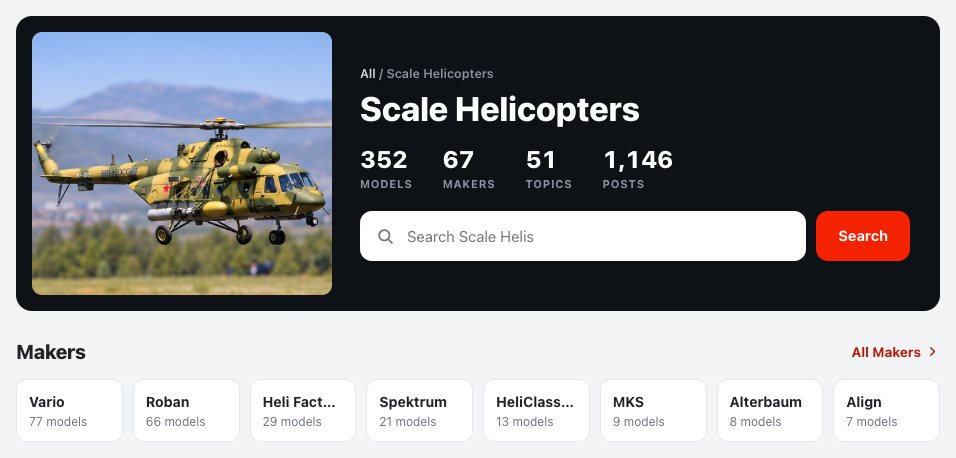
A world's feed opens with the world's picture and name, how many models, makers, topics and posts it has, a search box for that world, and its eight makers with the most models. Tap a maker to see its models, or All Makers to open Browse by Model. The shelves between the first few posts show models pilots are setting up, a few busy topics, and build stories worth a read.
That opening belongs to the plain first page of the feed. Pick a topic or a model, search, or tap Show More, and you get the list of posts alone.
Where a post lives
A post lives in one world: the world you are in when you post, or the one you pick. Posting from the All world asks which world it is for. Staff can also show a post in other worlds. See How Filing Works and Showing a Post in Other Worlds.